
The simplified newsletter workflow.
Texavor connects to your Substack account to create drafts and publish content instantly. Since Substack doesn't have a public API, we use a secure cookie-based connection that mimics your browser session.
Features
- Smart Auth: We automatically detect your User ID, so you don't have to find it manually.
- Markdown Support: We send high-fidelity Markdown directly, preserving your formatting.
- Instant Publishing: Choose to save as a draft or go live immediately.
- Cover Images: We automatically prepend your article's cover image to the post.
1. Get Your Session Cookie
Substack requires a valid session cookie (substack.sid) to authenticate.
- Open Substack.com in your browser and log in.
- Open Developer Tools:
- Right-click anywhere and select Inspect.
- Or press
F12(Windows) /Cmd+Option+I(Mac).
- Find the Cookie:
- Go to the Application tab (Chrome/Edge) or Storage tab (Firefox).
- Expand Cookies in the sidebar.
- Click on
https://your-subdomain.substack.com. - Find the cookie named
substack.sid.
- Copy the Value: It’s a long string starting with
s%3A.... Copy the entire value.
[!NOTE]
Cookies expire periodically (usually every 30 days). If publishing fails with "403 Not Authorized", simply repeat this step to update your cookie.
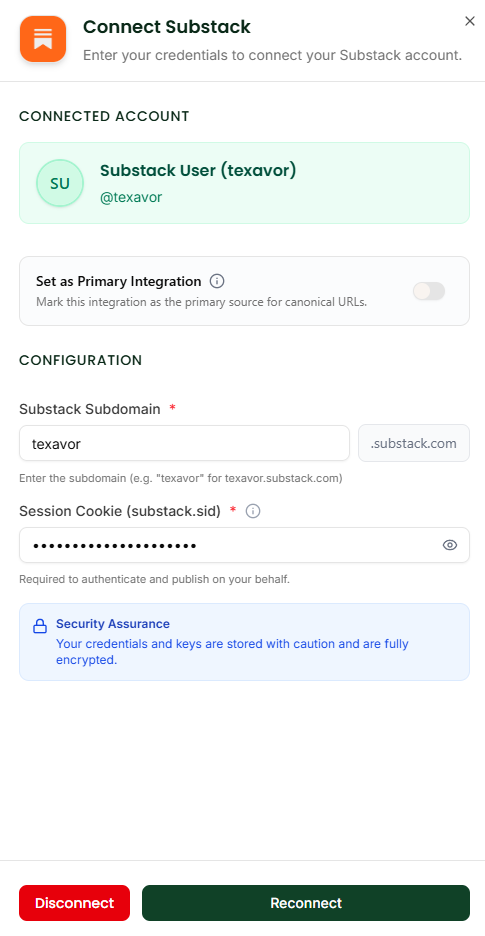
2. Connect in Texavor
- Navigate to Integrations.
- Click Connect on the Substack card.
- Subdomain: Enter just the name (e.g.,
texavorfortexavor.substack.com). - Session Cookie: Paste the
substack.sidvalue you copied. - Click Connect.
We will automatically fetch and verify your User ID when you save. You should see a success message: "Connected! Found User ID: 12345..."
3. Publishing Workflow
When you click Deploy:
- Select [x] Substack.
- Save as Draft:
- Yes (Default): Creates a draft in Substack for you to review.
- No: Publishes the post immediately to your live newsletter.
- Audience: Choose "Everyone", "Paid Subscribers", or "Founders".
- Send Email: Check this if you want to email the post immediately (only works if publishing immediately).
Your article will appear in your Substack Dashboard!
Support & Resources
Need help publishing your content strategy?
- 📧 Email Support: hello@texavor.com
- 📚 Documentation: Browse the full guide