
title: "The Command Center"
date: "2026-01-08"
description: "Master the Texavor interface to streamline your workflow. Your bridge between raw data, content creation, and published authority across all your channels."
category: "platform"
order: 2
Texavor is the Research-First CMS & Authority Engine.
This guide explains how to navigate the interface.
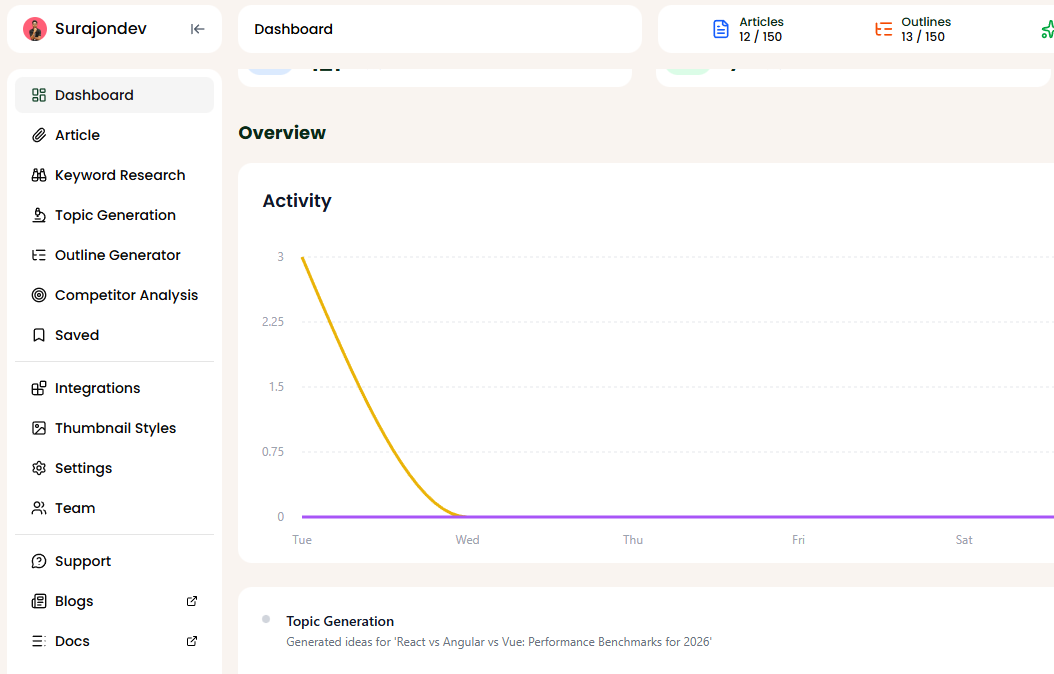
Sidebar Navigation
The sidebar is your primary navigation tool, organized by function:
🏠 Command Center
- Dashboard: Your main overview. Monitor recent activity, freshness risks, and quick stats.
📝 Creation Suite
Where content is born.
- Article: The master writing interface. Manage drafts and published content.
- Topic Generation: Use AI to brainstorm high-impact content ideas.
- Outline Generator: Build structurally sound, GEO-optimized outlines.
- Thumbnail Styles: Configure visual styles for automated asset generation.
- Saved: Access your bookmarked outlines, topics, and drafts.
🧠 Intelligence Suite
Where strategy is defined.
- Keyword Research: Analyze search volume, difficulty, and AI intent.
- Competitor Analysis: Track how other brands are ranking in LLMs.
⚙️ Platform & Config
- Integrations: Connect and manage your CMS (Dev.to, Medium, etc.).
- Settings: Configure profile and app preferences.
- Team: Manage members and permissions.
Support & Resources
Need help publishing your content strategy?
- 📧 Email Support: hello@texavor.com
- 📚 Documentation: Browse the full guide