
Target keywords that AI can actually answer.
Traditional tools only show "Volume" and "Difficulty". Texavor adds a crucial third dimension: AI Visibility.
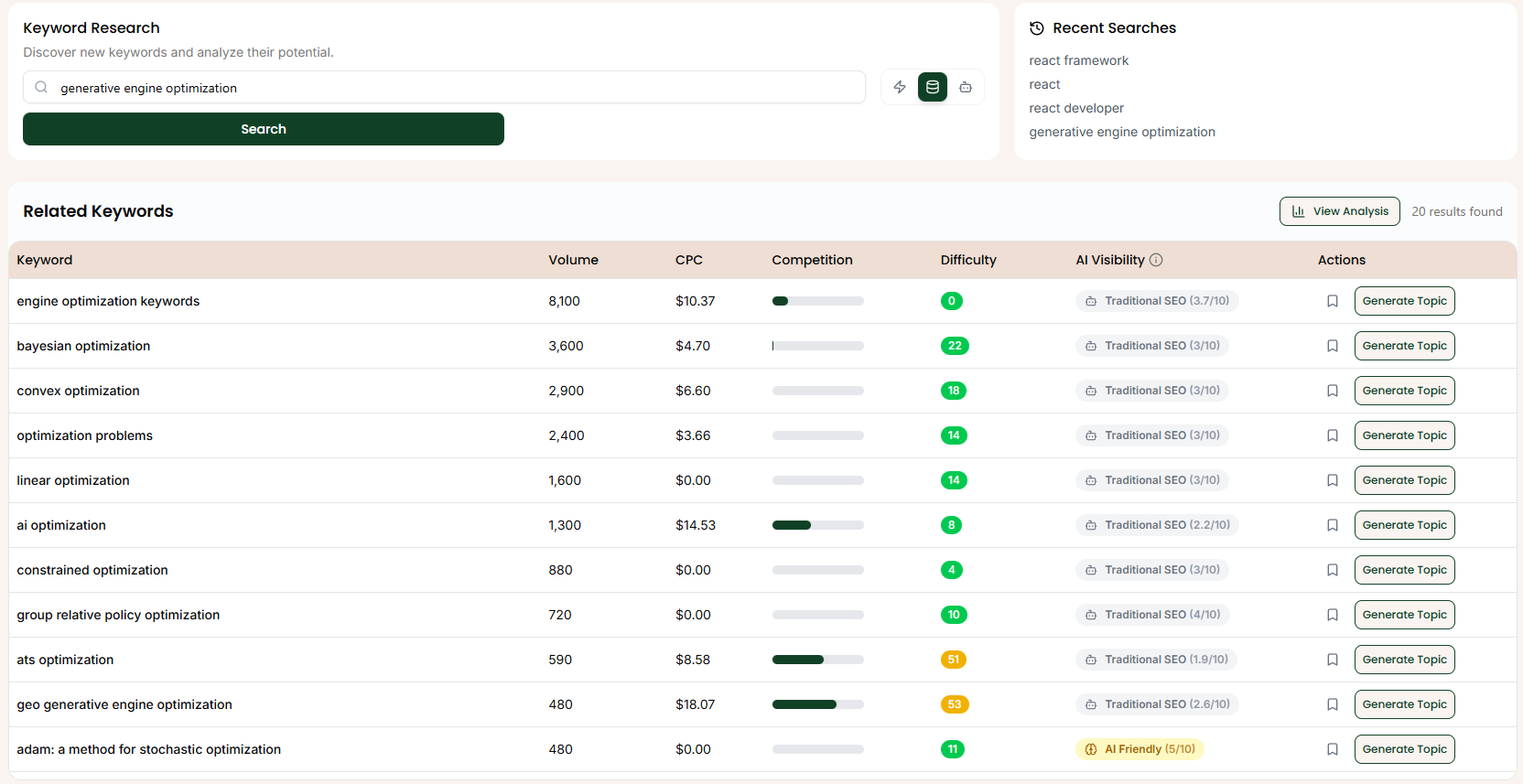
1. The Interface
Enter a seed topic (e.g., generative engine optimization) to see a list of related terms.
Key Metrics
- Volume: Monthly search volume.
- CPC: Cost Per Click (Commercial Intent proxy).
- Difficulty (0-100): How hard it is to rank on Google.
- AI Visibility: The Texavor Advantage.
Search Modes
The toggle next to the search bar controls the depth of analysis:
- Basic: Clarified it returns related keywords without metrics (fast brainstorming).
- Detailed: Confirmed this is where Volume/Difficulty/CPC live.
- Prompt: Kept as the "AI Visibility" mode.
2. AI Visibility Scores
This column tells you if an LLM is likely to surface your content.
⚠️ Traditional SEO (Red/Grey):
- Score: < 4.0/10
- Meaning: AI answers this poorly or genericly. You need massive Domain Authority to rank.
- Action: approach with caution.
⚡ AI Friendly (Yellow/Green):
- Score: > 5.0/10
- Meaning: This is a "Gap" in the Knowledge Graph. AI models are looking for structured data on this topic.
- Action: High Priority. Write this immediately.
3. Deep Analysis
Click the View Analysis button (or the eye icon) to open the Inspection Sidebar.

- Difficulty Gauge: Visual representation of ranking difficulty.
- Competition: Bar chart showing how crowded the space is.
- Volume/CPC: Quick stats card.
Support & Resources
Need help publishing your content strategy?
- 📧 Email Support: hello@texavor.com
- 📚 Documentation: Browse the full guide